> ## Documentation Index
> Fetch the complete documentation index at: https://docs.throney.gg/llms.txt
> Use this file to discover all available pages before exploring further.
# Officer Commands
> Comprehensive guide to commands available for officers in Throney, allowing advanced management of guilds, alliances, and members.
Officers in Throney have access to advanced commands that facilitate better guild and alliance management. These commands provide tools for editing data, tracking members, and optimizing group efficiency.
## 📜 Command Overview
| Command | Description |
| ---------------------------- | ---------------------------------------------------------------------------------------------- |
| `/attendance` | Take attendance for events, logging participation automatically. |
| `/upload [image] [user]` | Upload an image for another member, allowing officers to update their gear data. |
| `/stats [image] [user]` | Upload an image for another member's stats, updating their build details. |
| `/edit` | Manually edit a user's data in case of OCR errors. |
| `/delete` | Remove a user's data from the system, typically used when a member leaves the guild. |
| `/alliance info` | Provides an overview of all guilds in the alliance, including gear averages and composition. |
| `/alliance members` | Displays a sortable list of all members across the entire alliance. |
| `/guild info` | Displays a breakdown of a specific guild’s members and their statistics. |
| `/guild members` | Lists all members within a specific guild and sorts them by a variable such as combat power. |
| `/remind [days]` | Sends a DM reminder to members who have not updated their gear within the specified timeframe. |
| `/alliance check` | Displays a list of members in the alliance who have not uploaded their gear. |
| `/events` | Lists all upcoming events and their assigned DKP values. |
| `/say` | Send a custom embed message as the bot with color, title, footer, and image options. |
| `/adjust [award]` | Grants DKP points to a user. |
| `/adjust [deduct]` | Deducts DKP points from a user. |
| `/topwishlist` | Displays the most desired items based on wishlist data. |
| `/checkwishlist` | Allows officers to check a specific user's wishlist. |
| `/bonus` | Take attendance not tied to a specific event type (ad-hoc DKP awards). |
| `/bulkadjust [award/deduct]` | Award or deduct DKP for all registered members at once. |
| `/loadout` | Display alliance loadout party compositions in Discord. |
| `/absent set` | Mark a member as absent/on leave for a date range. |
## `/attendance`
Logs attendance at the end of an event and tracks member participation. Officers can choose an event from a custom list created by the officer core. This command also integrates DKP values by assigning a configurable 'weight' to each event, allowing officers to track contributions effectively.
```bash theme={null}
/attendance
```
## `/edit`
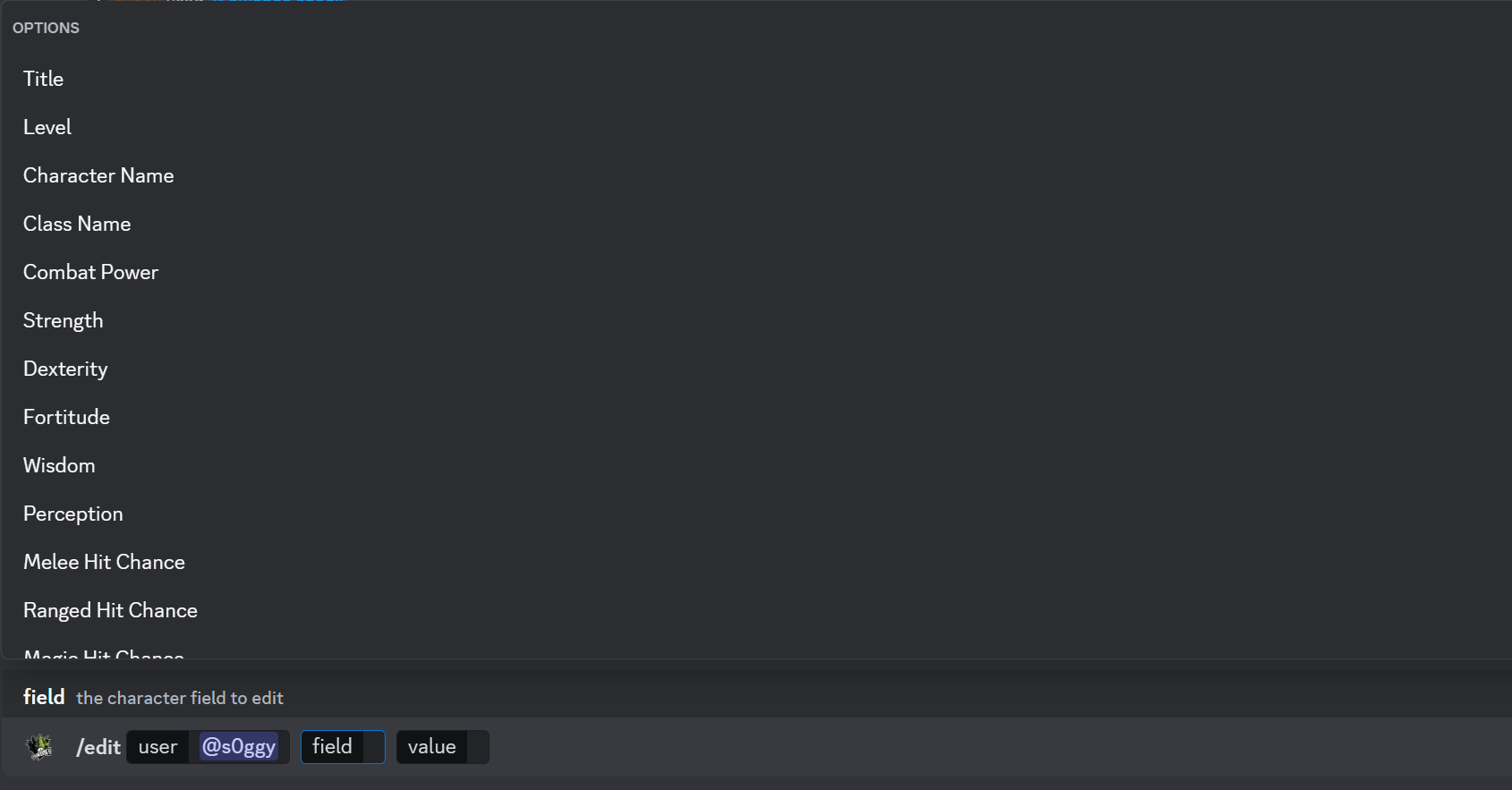
Manually edit a user's data input in case of OCR errors. While we strive to make sure Throney is as accurate as possible, mistakes happen. this command is to correct them!
Officers can modify gear information if it was misread by the OCR. This is particularly useful for names with non-English characters.
```bash theme={null}
/edit
```
### 📸 **Example of an Edit Panel**
 ## `/delete`
Remove a user's data from the system, typically when they leave the guild.
```bash theme={null}
/delete
```
This command ensures that former members are no longer included in guild statistics.
## `/alliance info`
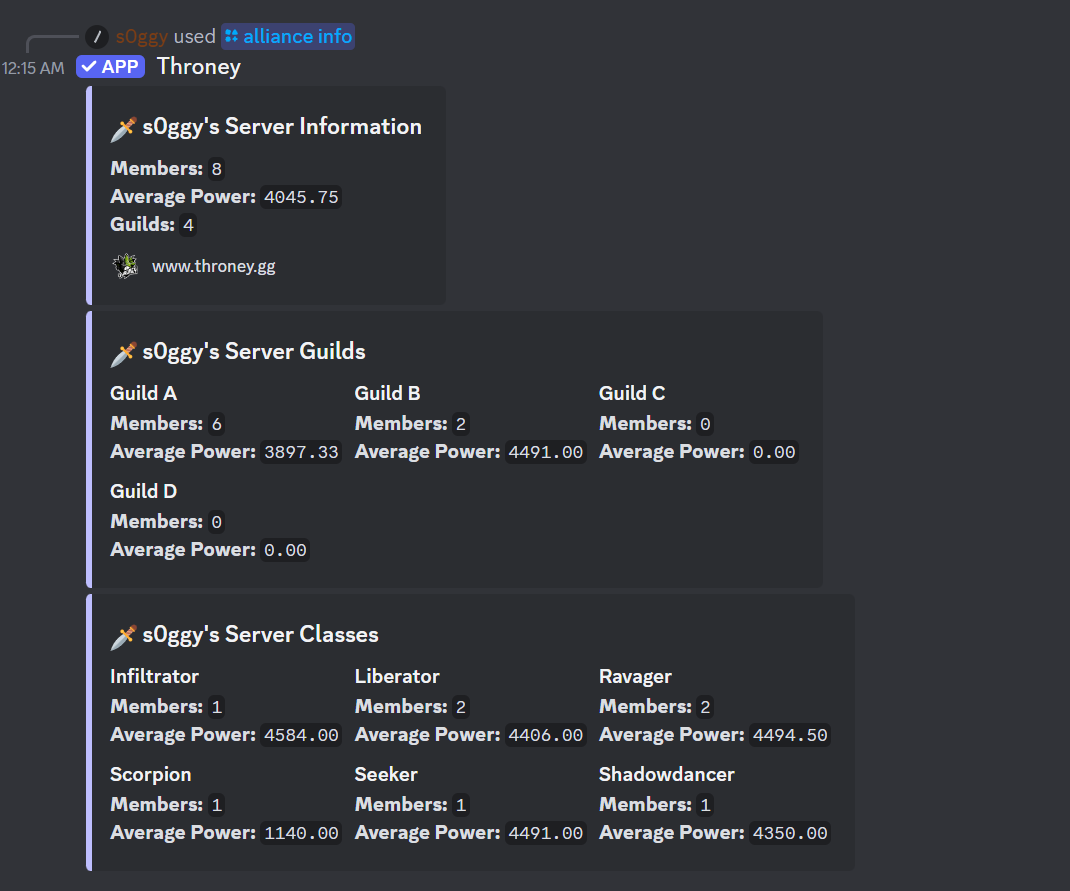
Provides an overview of all guilds in the alliance, including gear averages and composition.
```bash theme={null}
/alliance info
/alliance info [guilds] [classes]
```
### 📸 **Example of a `/alliance info` output**
Below is an example of a properly executed /alliance info command with guilds and classes enabled:
## `/delete`
Remove a user's data from the system, typically when they leave the guild.
```bash theme={null}
/delete
```
This command ensures that former members are no longer included in guild statistics.
## `/alliance info`
Provides an overview of all guilds in the alliance, including gear averages and composition.
```bash theme={null}
/alliance info
/alliance info [guilds] [classes]
```
### 📸 **Example of a `/alliance info` output**
Below is an example of a properly executed /alliance info command with guilds and classes enabled:
 ## `/alliance members`
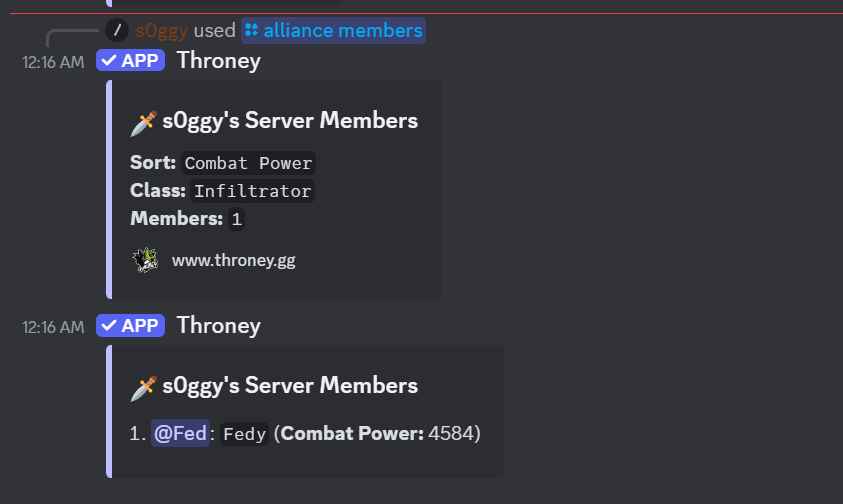
Displays a sortable list of all members across the entire alliance.
```bash theme={null}
/alliance members
/alliance members [sort] [class]
```
### 📸 **Example of a `/alliance members` output**
Below is an example of a properly executed /alliance members command with the class Infiltrator as a filter and combat power as a metric
## `/alliance members`
Displays a sortable list of all members across the entire alliance.
```bash theme={null}
/alliance members
/alliance members [sort] [class]
```
### 📸 **Example of a `/alliance members` output**
Below is an example of a properly executed /alliance members command with the class Infiltrator as a filter and combat power as a metric
 ## `/guild info`
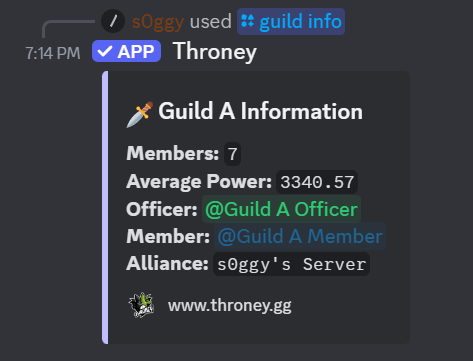
Displays a breakdown of a specific guild’s members and their statistics.
```bash theme={null}
/guild info
/guild info [name] [classes]
```
### 📸 **Example of a `/guild info` output**
Below is an example of a properly executed /guild info command with Guild A chosen
## `/guild info`
Displays a breakdown of a specific guild’s members and their statistics.
```bash theme={null}
/guild info
/guild info [name] [classes]
```
### 📸 **Example of a `/guild info` output**
Below is an example of a properly executed /guild info command with Guild A chosen
 ## `/guild members`
Lists all members within a specific guild and sorts them by a metric such as combat power.
```bash theme={null}
/guild members
/guild members [name] [sort] [classes]
```
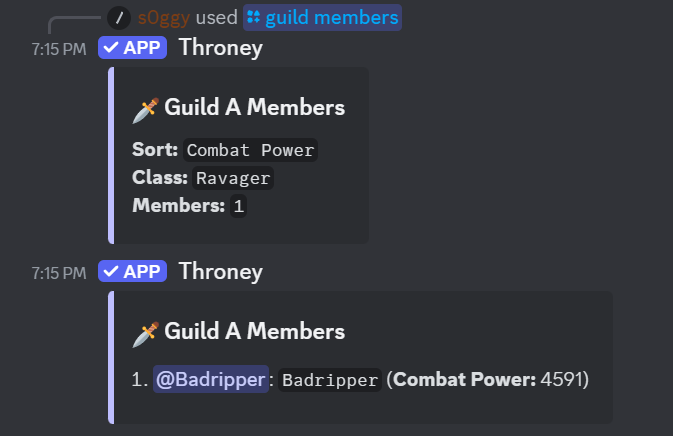
### 📸 **Example of a `/guild members` output**
Below is an example of a properly executed /guild members command with Guild A and Ravager chosen sorting by combat power.
## `/guild members`
Lists all members within a specific guild and sorts them by a metric such as combat power.
```bash theme={null}
/guild members
/guild members [name] [sort] [classes]
```
### 📸 **Example of a `/guild members` output**
Below is an example of a properly executed /guild members command with Guild A and Ravager chosen sorting by combat power.
 ## `/remind [days]`
Sends a DM reminder to members who have not updated their gear within the specified timeframe.
```bash theme={null}
/remind
```
Officers can specify the number of days since the last update, and the bot will notify members who have not refreshed their gear. This helps ensure all player data remains up-to-date.
## `/alliance check`
Displays a list of members in the alliance who have not uploaded their gear.
```bash theme={null}
/alliance check
```
### 📸 **Example of an Alliance Check Report**
## `/remind [days]`
Sends a DM reminder to members who have not updated their gear within the specified timeframe.
```bash theme={null}
/remind
```
Officers can specify the number of days since the last update, and the bot will notify members who have not refreshed their gear. This helps ensure all player data remains up-to-date.
## `/alliance check`
Displays a list of members in the alliance who have not uploaded their gear.
```bash theme={null}
/alliance check
```
### 📸 **Example of an Alliance Check Report**
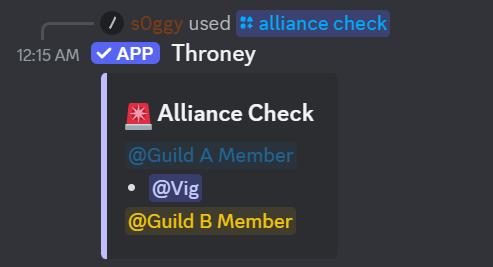 in this case, Vig from Guild A has not yet uploaded their gear and you can DM them to do so. the bot will not automatically DM them.
## `/events`
Lists all upcoming events and their assigned DKP values.
```bash theme={null}
/events
```
### 📸 **Example of Event List**
in this case, Vig from Guild A has not yet uploaded their gear and you can DM them to do so. the bot will not automatically DM them.
## `/events`
Lists all upcoming events and their assigned DKP values.
```bash theme={null}
/events
```
### 📸 **Example of Event List**
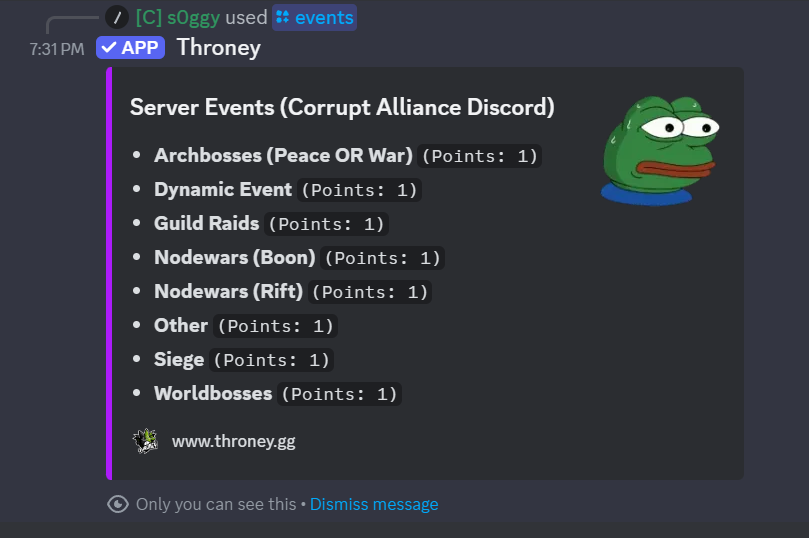 The points next to each event is the DKP value of the event.
## `/say`
Send a custom embed message as the bot in the current channel. Useful for announcements, reminders, or formatted guild messages.
```bash theme={null}
/say [description] [color]
/say [description] [color] [title] [footer] [image]
```
**Required:**
* **description** - The main text content of the embed. Use `\n` for line breaks.
* **color** - Choose from: Random, White, Aqua, Green, Blue, Yellow, Purple, Gold, Orange, Red, Navy, and more.
**Optional:**
* **title** - A title for the embed
* **footer** - Custom footer text
* **image** - Attach an image to display in the embed
The message is posted by the bot but shows your name as the author.
## `/adjust [award]`
Allows officers to manually **award** DKP points to a user.
```bash theme={null}
/adjust [award] [user] [amount]
/adjust award @user 50
```
This command is used to reward members for participation, achievements, or any custom criteria set by the guild.
## `/adjust [deduct]`
Allows officers to manually deduct DKP points from a user.
```bash theme={null}
/adjust [deduct] [user] [amount]
/adjust deduct @user 50
```
This command is used to remove DKP points for penalties, missed events, or other guild-related reasons.
## `/checkwishlist`
Allows an officer to check a specific users wishlist in discord
```bash theme={null}
/checkwishlist @user
```
This command helps officers track what users are looking for and better manage loot distribution.
## `/topwishlist`
Allows the officers to check the top 10 most desired items with prioritized requests
```bash theme={null}
/topwishlist
```
This provides officers with insight into which items are in the highest demand.
## `/bonus`
Take attendance for members in the voice channel without tying it to a specific event type. Useful for ad-hoc activities like helping with guild tasks, donations, or off-schedule participation.
```bash theme={null}
/bonus
```
Works identically to `/attendance` but records as a "bonus" attendance type.
## `/bulkadjust`
Award or deduct DKP for all registered members in your alliance at once.
```bash theme={null}
/bulkadjust award 50
/bulkadjust deduct 25
```
All bulk operations are logged in the audit trail with the officer who executed them.
## `/loadout`
Display alliance loadout party compositions directly in Discord. Shows party breakdowns with character names and roles.
```bash theme={null}
/loadout
```
Skips empty parties or loadouts with no members. Replaces the older `/party` command which has been removed.
The points next to each event is the DKP value of the event.
## `/say`
Send a custom embed message as the bot in the current channel. Useful for announcements, reminders, or formatted guild messages.
```bash theme={null}
/say [description] [color]
/say [description] [color] [title] [footer] [image]
```
**Required:**
* **description** - The main text content of the embed. Use `\n` for line breaks.
* **color** - Choose from: Random, White, Aqua, Green, Blue, Yellow, Purple, Gold, Orange, Red, Navy, and more.
**Optional:**
* **title** - A title for the embed
* **footer** - Custom footer text
* **image** - Attach an image to display in the embed
The message is posted by the bot but shows your name as the author.
## `/adjust [award]`
Allows officers to manually **award** DKP points to a user.
```bash theme={null}
/adjust [award] [user] [amount]
/adjust award @user 50
```
This command is used to reward members for participation, achievements, or any custom criteria set by the guild.
## `/adjust [deduct]`
Allows officers to manually deduct DKP points from a user.
```bash theme={null}
/adjust [deduct] [user] [amount]
/adjust deduct @user 50
```
This command is used to remove DKP points for penalties, missed events, or other guild-related reasons.
## `/checkwishlist`
Allows an officer to check a specific users wishlist in discord
```bash theme={null}
/checkwishlist @user
```
This command helps officers track what users are looking for and better manage loot distribution.
## `/topwishlist`
Allows the officers to check the top 10 most desired items with prioritized requests
```bash theme={null}
/topwishlist
```
This provides officers with insight into which items are in the highest demand.
## `/bonus`
Take attendance for members in the voice channel without tying it to a specific event type. Useful for ad-hoc activities like helping with guild tasks, donations, or off-schedule participation.
```bash theme={null}
/bonus
```
Works identically to `/attendance` but records as a "bonus" attendance type.
## `/bulkadjust`
Award or deduct DKP for all registered members in your alliance at once.
```bash theme={null}
/bulkadjust award 50
/bulkadjust deduct 25
```
All bulk operations are logged in the audit trail with the officer who executed them.
## `/loadout`
Display alliance loadout party compositions directly in Discord. Shows party breakdowns with character names and roles.
```bash theme={null}
/loadout
```
Skips empty parties or loadouts with no members. Replaces the older `/party` command which has been removed.