> ## Documentation Index
> Fetch the complete documentation index at: https://docs.throney.gg/llms.txt
> Use this file to discover all available pages before exploring further.
# User Commands
> Comprehensive guide to commands available for all Throney users, facilitating effective guild management and personal profile enhancements.
Throney offers a suite of commands empowering users to manage their profiles, gear, and engage seamlessly within their guilds. Below is a detailed guide to each command, its usage, and benefits.
## 📜 Command Overview
| Command | Description |
| ----------------- | ------------------------------------------------------------------------------------------- |
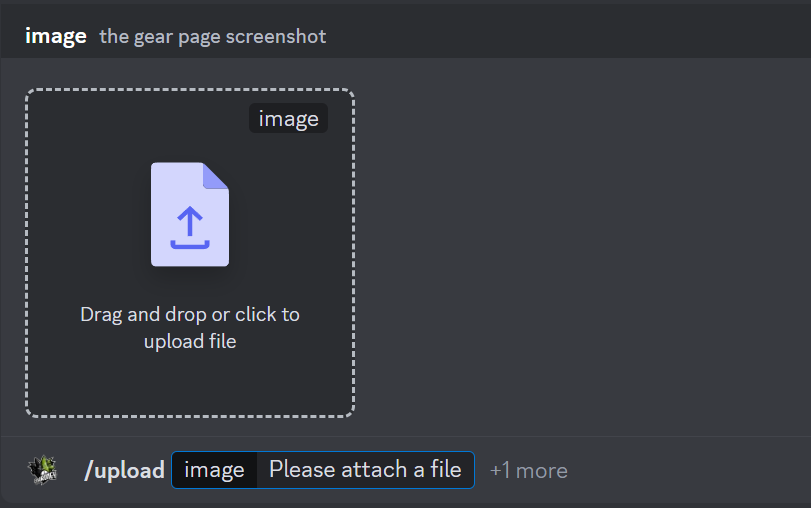
| `/upload` | Upload your gear by attaching a full screenshot of your character's profile page. |
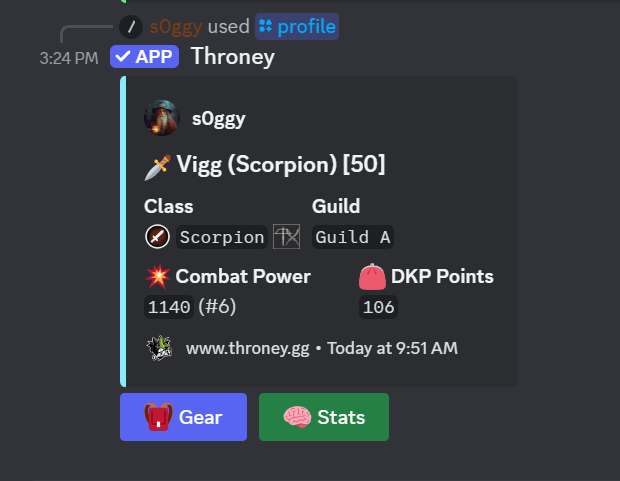
| `/profile` | View your own or another user's gear set by mentioning them. |
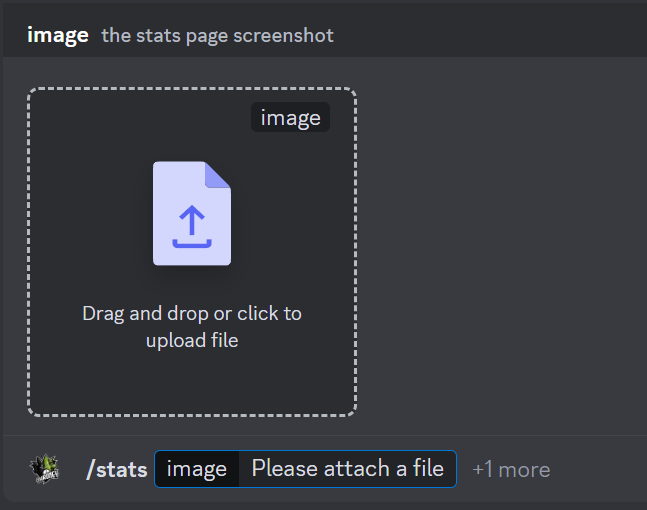
| `/stats` | Upload your build stats, including Hit Chance, Critical Hit Chance, Evasion, and Endurance. |
| `/builds` | Display available class names and their associated weapon combinations. |
| `/questlog` | Add your build link to your character profile. |
| `/help` | Show a list of available commands for both members and officers. |
| `/absent` | Mark yourself as absent for a set timeframe and provide a reason. |
| `/return` | Return from an absence early and restore your active status. |
| `/wishlist` | Add an item to your wishlist with a priority level and an optional note. |
| `/dkp` | Check your current DKP balance. |
| `/mywishlist` | View your personal wishlist. |
| `/removewishlist` | Remove an item from your wishlist. |
| `/roll` | Roll dice with custom ranges or standard dice types (d4, d6, d8, d10, d12, d20, d100). |
| `/ping` | Check the bot's latency. |
| `/invite` | Get the bot invite link to add Throney to another server. |
| `/website` | Get the link to the Throney website and dashboard. |
## `/upload`
Upload your current gear to Throney's database, allowing for accurate tracking and display within your guild.
```bash theme={null}
/upload
/upload [user] *Officer Only Command*
```
## `/profile`
View your own gear setup or inspect another guild member's equipment
```bash theme={null}
/profile
/profile @username
```
## `/stats`
Upload and display your build statistics, providing leadership with insights into member capabilities.
```bash theme={null}
/stats
/stats [user] *Officer only Command*
```
Attach a screenshot that displays your Hit Chance, Critical Hit Chance, Evasion, and Endurance. While optional, this command is highly recommended as it allows officers to analyze guild statistics and determine build trends.
## `/builds`
Explore available classes and their corresponding weapon combinations.
```bash theme={null}
/builds
```
### 📜 Example Class & Weapon Combinations
| Class | Weapons |
| ------------- | ----------------------------- |
| **Crusader** | Greatsword + Sword and Shield |
| **Seeker** | Longbow + Wand |
| **Berserker** | Sword and Shield + Daggers |
| **Ravager** | Greatsword + Daggers |
| **Templar** | Sword and Shield + Wand |
## `/absent`
Use this command to mark yourself as absent for a specific timeframe. This will be logged in your profile and eventually reflected on the Throney dashboard and Dynamic Events (Signups).
typing /absent opens up a form, which asks for information related to your leave of absence.
```bash theme={null}
/absent
```
Absences automatically prevent you from appearing in Signups (Dynamic Events).
Officers can view absences in user profiles after T2 launch.
## `/return`
Allows you to return from an absence early, restoring your active status.
```bash theme={null}
/return
```
This will update your status back to active in the system.
Your participation in Signups (Dynamic Events) will be back to normal when this feature is fully integrated.
🛠 Future Enhancements for Absence Tracking
* Officers will see absences on the dashboard after T2 launch.
* Users marked as absent will automatically be removed from event signups.
* Possible automated role adjustments for absent players.
## `/wishlist`
The `/wishlist` command allows users to add items they want to a wishlist with a priority level and an optional note.
```bash theme={null}
/wishlist [Optional: note]
```
### **Priority Levels**
* archboss 🟣
* high 🔴
* medium 🟡
* low 🟢
Items are found by searching for the name of the item.
Optional: Users can add a note for more details.
## `/dkp`
View your DKP balance as an ephemeral message.
```bash theme={null}
/dkp
```
## `/mywishlist`
View your wishlist as an ephemeral message.
```bash theme={null}
/mywishlist
```
## `/removewishlist`
Remove an item from your wishlist.
```bash theme={null}
/removewishlist
```
Search for the item name and select it. The item is removed from your wishlist immediately.
## `/questlog`
Link your build or specialization info to your character profile so officers and members can see it.
```bash theme={null}
/questlog
```
The link appears on your `/profile` embed and on the dashboard player profile.
## `/roll`
A simple dice roller for loot rolls, tiebreakers, or just for fun.
```bash theme={null}
/roll
/roll [min] [max]
/roll [sides]
```
* Default range is 0-100
* Optionally set custom min/max values
* Or pick a standard dice type: d4, d6, d8, d10, d12, d20, d100
## `/ping`
Check the bot's current latency (client and websocket ping).
```bash theme={null}
/ping
```
## `/invite`
Get the invite link to add Throney to another Discord server.
```bash theme={null}
/invite
```
## `/website`
Get a quick link to the Throney website and dashboard.
```bash theme={null}
/website
```
 ## `/profile`
View your own gear setup or inspect another guild member's equipment
```bash theme={null}
/profile
/profile @username
```
## `/profile`
View your own gear setup or inspect another guild member's equipment
```bash theme={null}
/profile
/profile @username
```
 ## `/stats`
Upload and display your build statistics, providing leadership with insights into member capabilities.
```bash theme={null}
/stats
/stats [user] *Officer only Command*
```
Attach a screenshot that displays your Hit Chance, Critical Hit Chance, Evasion, and Endurance. While optional, this command is highly recommended as it allows officers to analyze guild statistics and determine build trends.
## `/stats`
Upload and display your build statistics, providing leadership with insights into member capabilities.
```bash theme={null}
/stats
/stats [user] *Officer only Command*
```
Attach a screenshot that displays your Hit Chance, Critical Hit Chance, Evasion, and Endurance. While optional, this command is highly recommended as it allows officers to analyze guild statistics and determine build trends.
 ## `/builds`
Explore available classes and their corresponding weapon combinations.
```bash theme={null}
/builds
```
### 📜 Example Class & Weapon Combinations
| Class | Weapons |
| ------------- | ----------------------------- |
| **Crusader** | Greatsword + Sword and Shield |
| **Seeker** | Longbow + Wand |
| **Berserker** | Sword and Shield + Daggers |
| **Ravager** | Greatsword + Daggers |
| **Templar** | Sword and Shield + Wand |
## `/absent`
Use this command to mark yourself as absent for a specific timeframe. This will be logged in your profile and eventually reflected on the Throney dashboard and Dynamic Events (Signups).
typing /absent opens up a form, which asks for information related to your leave of absence.
```bash theme={null}
/absent
## `/builds`
Explore available classes and their corresponding weapon combinations.
```bash theme={null}
/builds
```
### 📜 Example Class & Weapon Combinations
| Class | Weapons |
| ------------- | ----------------------------- |
| **Crusader** | Greatsword + Sword and Shield |
| **Seeker** | Longbow + Wand |
| **Berserker** | Sword and Shield + Daggers |
| **Ravager** | Greatsword + Daggers |
| **Templar** | Sword and Shield + Wand |
## `/absent`
Use this command to mark yourself as absent for a specific timeframe. This will be logged in your profile and eventually reflected on the Throney dashboard and Dynamic Events (Signups).
typing /absent opens up a form, which asks for information related to your leave of absence.
```bash theme={null}
/absent