> ## Documentation Index
> Fetch the complete documentation index at: https://docs.throney.gg/llms.txt
> Use this file to discover all available pages before exploring further.
# Audit Logs
> Track every action taken in your alliance with a detailed, searchable activity log.
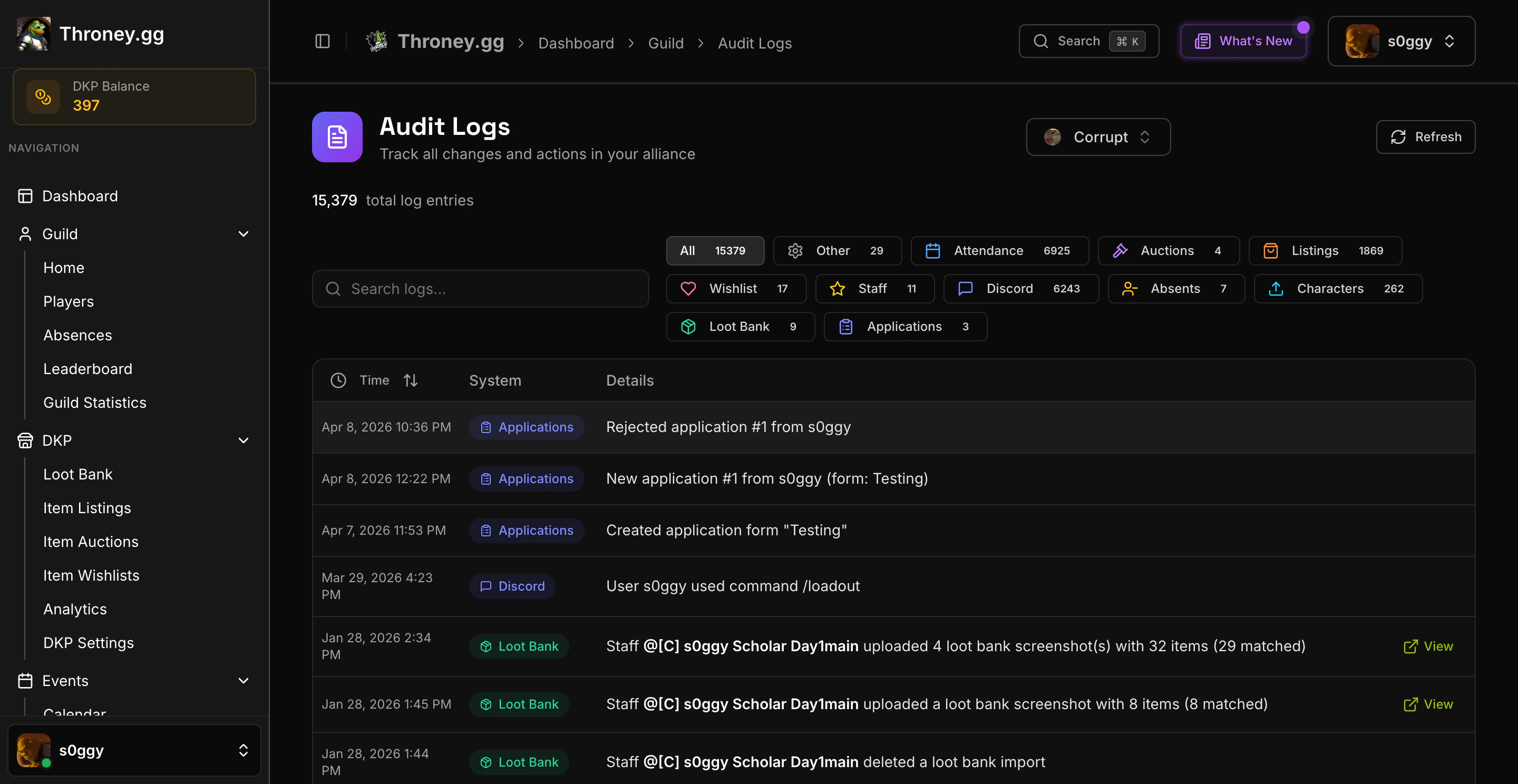
**Audit Logs** give officers full visibility into every action taken across the alliance. Every DKP adjustment, attendance call, application review, settings change, and member action is recorded with timestamps and who performed it.
 Audit Logs are **officer-only**. Members cannot access this page.
***
## What Gets Logged
| Category | Actions Tracked |
| ---------------- | ------------------------------------------------------------------------ |
| **DKP** | Point awards, deductions, bulk adjustments, decay events, auction awards |
| **Attendance** | Attendance calls, bonus events, member check-ins |
| **Applications** | Application submissions, approvals, rejections, blocklist changes |
| **Events** | Event creation, deletion, signup changes |
| **Members** | Character uploads, edits, deletions, guild transfers |
| **Settings** | Channel changes, role updates, feature toggles |
***
## Using Audit Logs
Navigate to **Audit Logs** in the sidebar.
### Searching
Use the search bar to find specific entries by keyword. Search matches against the log message text.
### Filtering by System
Filter logs by system category using the dropdown. Each system has a color-coded badge for quick visual scanning:
* **DKP** - Point and loot system actions
* **Attendance** - Event attendance tracking
* **Applications** - Recruitment pipeline actions
* **Events** - Scheduled event management
* **Members** - Character and roster changes
* **Settings** - Configuration changes
### Log Details
Each entry shows:
* **Timestamp** - When the action occurred
* **System badge** - Which feature area the action belongs to
* **Description** - What happened, including who did it and what was affected
***
## Best Practices
Check audit logs regularly if multiple officers manage the alliance. It's the fastest way to understand what changed and who changed it.
* Review logs after major events (attendance calls, DKP distributions) to verify everything was recorded correctly
* Use system filters to focus on a specific area when investigating an issue
* Audit logs are read-only and cannot be deleted or modified
Audit Logs are **officer-only**. Members cannot access this page.
***
## What Gets Logged
| Category | Actions Tracked |
| ---------------- | ------------------------------------------------------------------------ |
| **DKP** | Point awards, deductions, bulk adjustments, decay events, auction awards |
| **Attendance** | Attendance calls, bonus events, member check-ins |
| **Applications** | Application submissions, approvals, rejections, blocklist changes |
| **Events** | Event creation, deletion, signup changes |
| **Members** | Character uploads, edits, deletions, guild transfers |
| **Settings** | Channel changes, role updates, feature toggles |
***
## Using Audit Logs
Navigate to **Audit Logs** in the sidebar.
### Searching
Use the search bar to find specific entries by keyword. Search matches against the log message text.
### Filtering by System
Filter logs by system category using the dropdown. Each system has a color-coded badge for quick visual scanning:
* **DKP** - Point and loot system actions
* **Attendance** - Event attendance tracking
* **Applications** - Recruitment pipeline actions
* **Events** - Scheduled event management
* **Members** - Character and roster changes
* **Settings** - Configuration changes
### Log Details
Each entry shows:
* **Timestamp** - When the action occurred
* **System badge** - Which feature area the action belongs to
* **Description** - What happened, including who did it and what was affected
***
## Best Practices
Check audit logs regularly if multiple officers manage the alliance. It's the fastest way to understand what changed and who changed it.
* Review logs after major events (attendance calls, DKP distributions) to verify everything was recorded correctly
* Use system filters to focus on a specific area when investigating an issue
* Audit logs are read-only and cannot be deleted or modified