> ## Documentation Index
> Fetch the complete documentation index at: https://docs.throney.gg/llms.txt
> Use this file to discover all available pages before exploring further.
# Guild Member Profiles
> The Character System in Throney
Throney's **Character System** automates player data tracking so guild leadership always has accurate, up-to-date information without manual input.
Members upload their character data with a few simple commands.
***
## 📌 `/upload` – The Core Command
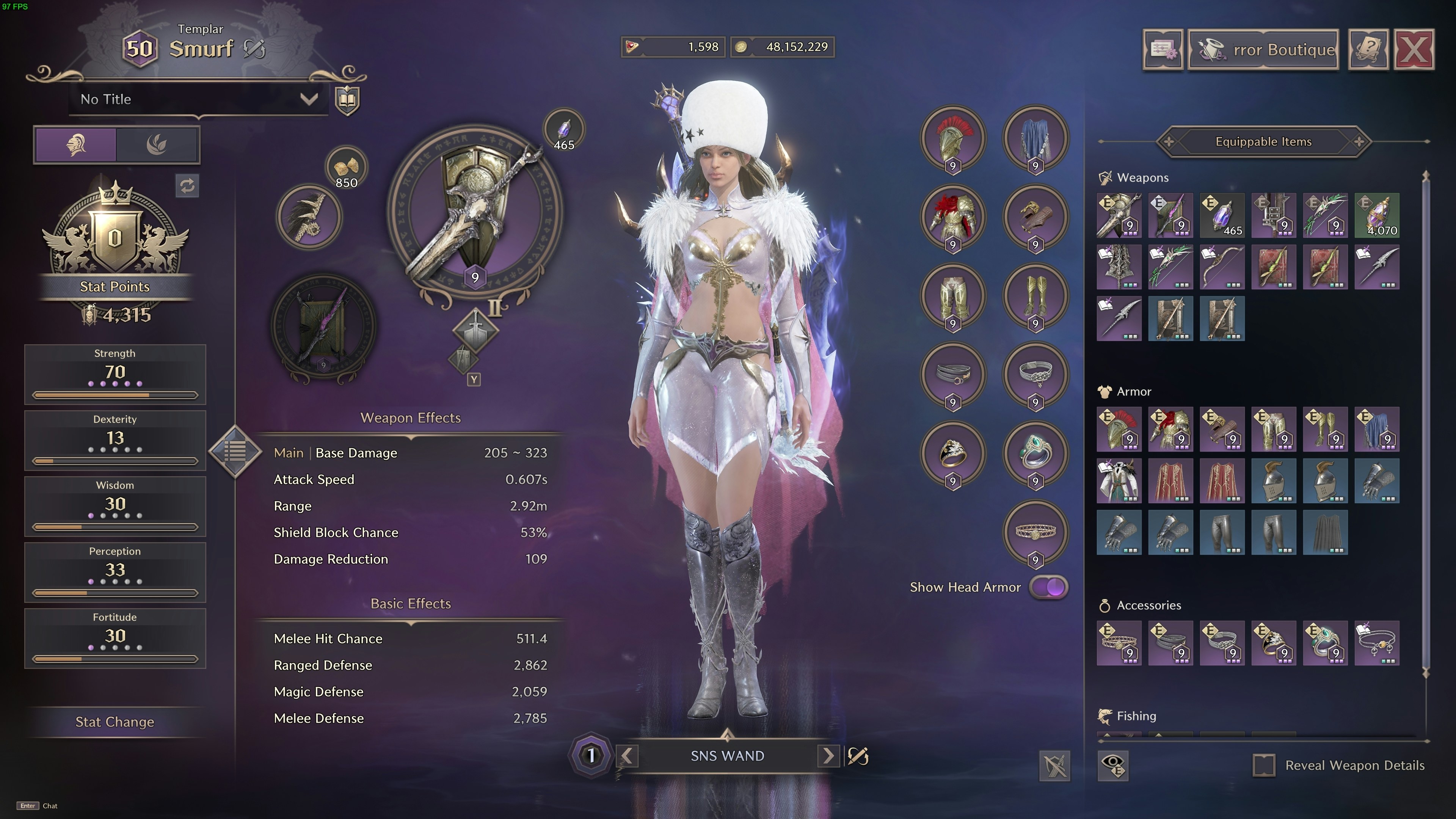
The `/upload` command **automatically captures** the following details from a player's **in-game character profile**:
* **Character Name**
* **Class**
* **Level**
* **Stats (Strength, Dexterity, Wisdom, Perception, Fortitude)**
* **Gear Setup**
**Guild Affiliation** is assigned by the member role set during `/setup`, automatically linking members to the correct guild based on Discord roles.
### 📷 How to Upload a Profile
1. Open the **Character Profile Page** (`P` by default).
2. Take a **screenshot** of your character’s profile.
3. Paste the **image** into the `/upload` command in Discord.
Throney will **extract and update all relevant data** using AI-powered OCR (GPT-5.2).
### Language Support
`/upload` natively supports **English and Portuguese** class names. For players using other languages (German, French, Spanish, Japanese, Korean, etc.), the system detects the class from the weapon combination shown in the screenshot. All 35 classes are supported regardless of language.
***
## 📸 Example Character Profile Upload
**No manual data entry is required.** Once uploaded, your **Character name, class, combat power, and stats** are automatically updated within Throney.
***
## 📊 `/stats` – Build Tracking
Members can **add additional build stats** by using the `/stats` command.
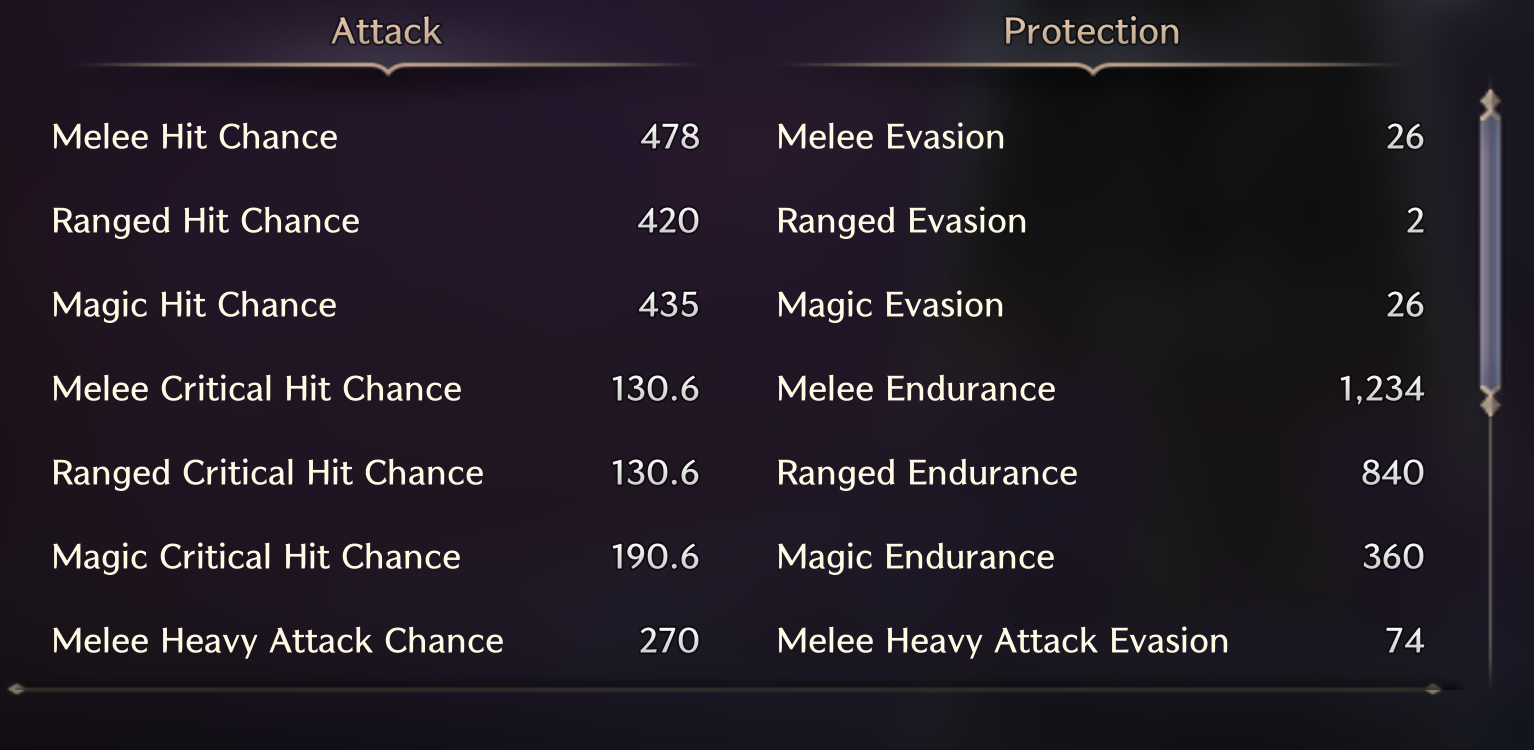
This **optional** command allows users to **attach a screenshot** showing deeper stat information like **Evasion**, **Endurance**, **Critical Hit Chance**, and **Hit Chance**.
### 📷 Where to Find This Image?
The build stats are found on the **Character Page**, accessible by clicking the **small stat button**.
### Example of a Proper `/stats` Upload
💡 **`Why Use /stats?`**
* Complements the character profile.
* **Website breakdowns** analyze build focuses across the guild (Endurance-heavy, Evasion-heavy, Crit-focused, etc.).
* Reflected in **individual profiles** for easy officer reference.
📌 **Recommendation:** Ensure that your `/stats` upload closely matches the example format above for best OCR accuracy.
***
## 🏷️ `/profile` – View Full Character Details
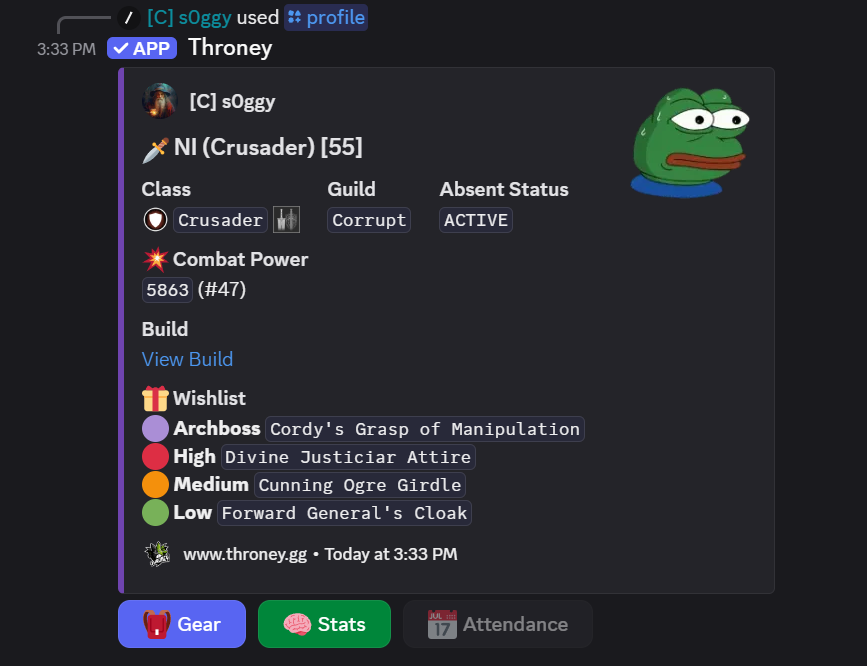
The `/profile` command provides a **quick snapshot** of any guild member’s information.
### 📌 What `/profile` Displays:
* **Class & Combat Power**
* **Guild Name**
* **Gear Overview**
* **Stats Overview**
* **Quest Log Build Input** (NEW!) – Player-submitted build links via `/questlog`
***
### 📸 Example of a `/profile` Embed
***
### How to Use `/profile`
* `/profile` → View your own profile.
* `/profile @user` → View another guild member’s profile.
🛠️ Clicking **Gear** or **Stats** toggles the embed view.
📜 If the user has a **Quest Log** (build input), it will also be shown.
***
## 🛠 `/questlog` – Build Input (NEW)
The `/questlog` command allows players to link their questlog that contains information about their builds, specialization, or focus.
```bash theme={null}
/questlog
```
This link appears on the player’s profile.
Officers and members can easily view intended builds and specializations.
## 🎯 `/wishlist` – Item Wishlist (NEW)
The `/wishlist` command allows members to indicate high-priority items they are interested in acquiring during loot distribution.
```bash theme={null}
/wishlist
```
Priority levels:
* 🔴 High Priority
* 🟠 Medium Priority
* 🟢 Low Priority
* 🟣 Archboss Item
Officers can view wishlists via the dashboard or Discord commands.
Wishlists help guide DKP loot decisions and item distributions fairly.
📜 Wishlists are fully integrated into player profiles for quick viewing.
Members can also remove wishlist items using `/removewishlist`.
***
## 📈 Gear Progression Tracking
Every time a member uses `/upload`, Throney records a stat snapshot. This powers the **Gear Progression Chart** on player profiles in the dashboard.
* View Combat Power history over time on an interactive chart
* Click any data point to see the full stat breakdown at that moment
* Compare changes between snapshots with delta values
Snapshots are only created when combat power changes, so duplicate uploads do not clutter the history.
 💡 **`Why Use /stats?`**
* Complements the character profile.
* **Website breakdowns** analyze build focuses across the guild (Endurance-heavy, Evasion-heavy, Crit-focused, etc.).
* Reflected in **individual profiles** for easy officer reference.
💡 **`Why Use /stats?`**
* Complements the character profile.
* **Website breakdowns** analyze build focuses across the guild (Endurance-heavy, Evasion-heavy, Crit-focused, etc.).
* Reflected in **individual profiles** for easy officer reference.
 ***
### How to Use `/profile`
* `/profile` → View your own profile.
* `/profile @user` → View another guild member’s profile.
🛠️ Clicking **Gear** or **Stats** toggles the embed view.
📜 If the user has a **Quest Log** (build input), it will also be shown.
***
## 🛠 `/questlog` – Build Input (NEW)
The `/questlog` command allows players to link their questlog that contains information about their builds, specialization, or focus.
```bash theme={null}
/questlog
```
This link appears on the player’s profile.
Officers and members can easily view intended builds and specializations.
## 🎯 `/wishlist` – Item Wishlist (NEW)
The `/wishlist` command allows members to indicate high-priority items they are interested in acquiring during loot distribution.
```bash theme={null}
/wishlist
***
### How to Use `/profile`
* `/profile` → View your own profile.
* `/profile @user` → View another guild member’s profile.
🛠️ Clicking **Gear** or **Stats** toggles the embed view.
📜 If the user has a **Quest Log** (build input), it will also be shown.
***
## 🛠 `/questlog` – Build Input (NEW)
The `/questlog` command allows players to link their questlog that contains information about their builds, specialization, or focus.
```bash theme={null}
/questlog
```
This link appears on the player’s profile.
Officers and members can easily view intended builds and specializations.
## 🎯 `/wishlist` – Item Wishlist (NEW)
The `/wishlist` command allows members to indicate high-priority items they are interested in acquiring during loot distribution.
```bash theme={null}
/wishlist