> ## Documentation Index
> Fetch the complete documentation index at: https://docs.throney.gg/llms.txt
> Use this file to discover all available pages before exploring further.
# Players Management
> View and manage alliance members, their stats, DKP history, and attendance records.
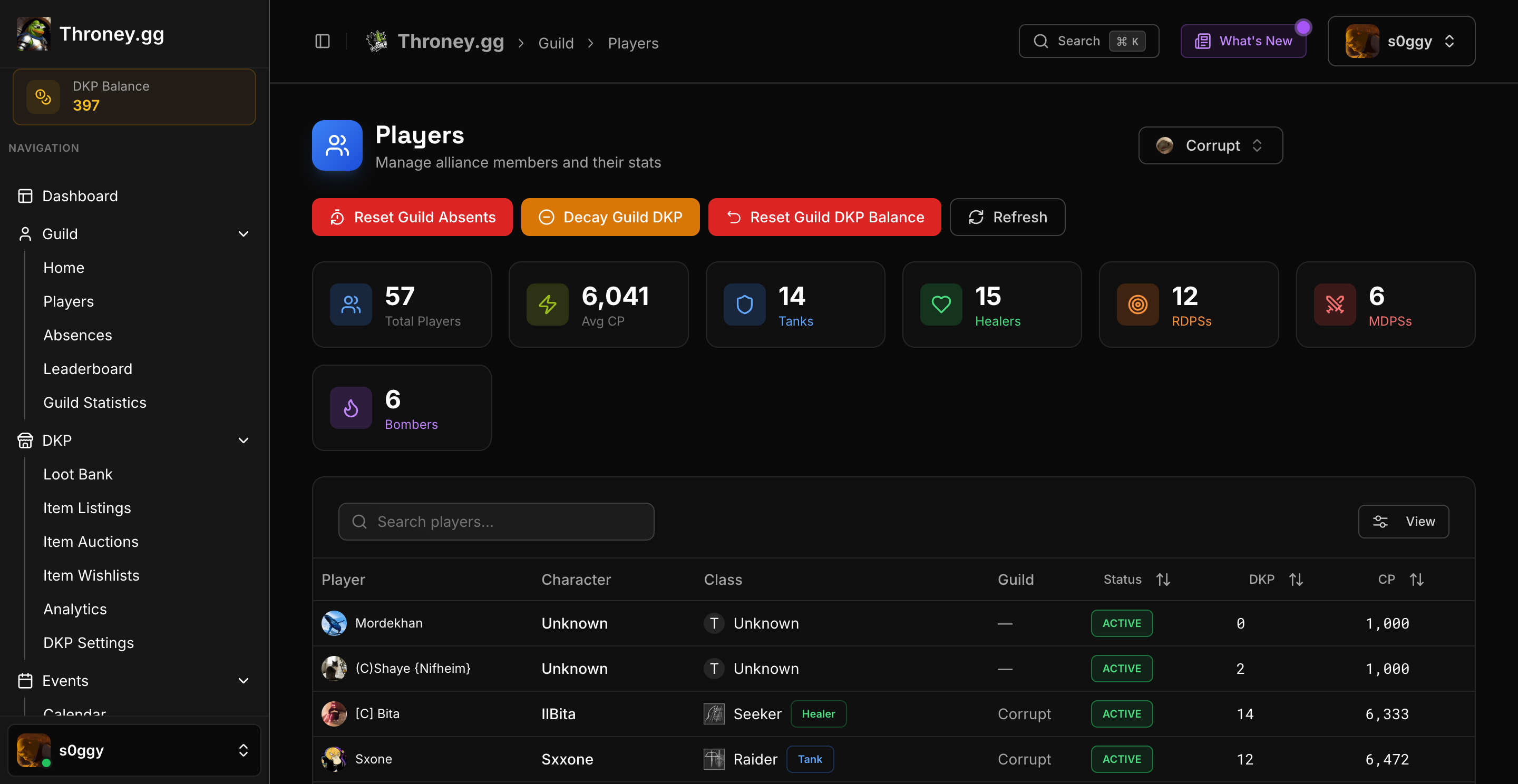
The Players Management system provides officers with a comprehensive view of all alliance members and their data.
 ***
## 📊 Players Overview
Navigate to **Management → Players** to see all alliance members in a sortable, searchable table.
### Displayed Information
* **Discord Name** – Member's Discord identity
* **Characters** – Linked in-game characters
* **Gear Score** – Current gear level
* **DKP Balance** – Available points
* **Events Attended** – Attendance count
* **Last Active** – Recent activity timestamp
***
## 🔍 Search & Filter
* **Search by Name** – Find specific players
* **Filter by Role** – Tank, Healer, MDPS, RDPS, Bomber
* **Sort Columns** – Click headers to sort by any field
***
## 👤 Individual Player Profiles
Click on any player to view their detailed profile:
### Profile Sections
**Character Info**
* All linked characters
* Gear score per character
* Primary role/class
**DKP History**
* Full transaction log
* Points earned from events
* Points spent on items
* Manual adjustments by officers
**Attendance Record**
* Events attended with dates
* Event types breakdown
* Attendance percentage
**Wishlist**
* Items on their priority list
* Priority levels for each
**Gear Progression**
* Interactive Combat Power chart showing history over time
* Click any data point for a full stat snapshot at that moment
* Delta comparisons between snapshots
**Recent Events**
* Last 5 attendance events and signup events the player participated in
* Direct links to each event page
***
## 🛠️ Officer Actions
From a player's profile, officers can:
* **Adjust DKP** – Add or subtract points manually
* **View Full History** – See all transactions
* **Check Attendance** – Review participation
* **Review Wishlist** – See their item priorities
All DKP adjustments create an audit trail visible in the player's history with the reason provided.
***
## 📈 Bulk Management
The Players page supports:
* **Export to CSV** – Download member data
* **Bulk Selection** – Select multiple members
* **Quick Stats** – Alliance-wide statistics summary
***
## 📊 Players Overview
Navigate to **Management → Players** to see all alliance members in a sortable, searchable table.
### Displayed Information
* **Discord Name** – Member's Discord identity
* **Characters** – Linked in-game characters
* **Gear Score** – Current gear level
* **DKP Balance** – Available points
* **Events Attended** – Attendance count
* **Last Active** – Recent activity timestamp
***
## 🔍 Search & Filter
* **Search by Name** – Find specific players
* **Filter by Role** – Tank, Healer, MDPS, RDPS, Bomber
* **Sort Columns** – Click headers to sort by any field
***
## 👤 Individual Player Profiles
Click on any player to view their detailed profile:
### Profile Sections
**Character Info**
* All linked characters
* Gear score per character
* Primary role/class
**DKP History**
* Full transaction log
* Points earned from events
* Points spent on items
* Manual adjustments by officers
**Attendance Record**
* Events attended with dates
* Event types breakdown
* Attendance percentage
**Wishlist**
* Items on their priority list
* Priority levels for each
**Gear Progression**
* Interactive Combat Power chart showing history over time
* Click any data point for a full stat snapshot at that moment
* Delta comparisons between snapshots
**Recent Events**
* Last 5 attendance events and signup events the player participated in
* Direct links to each event page
***
## 🛠️ Officer Actions
From a player's profile, officers can:
* **Adjust DKP** – Add or subtract points manually
* **View Full History** – See all transactions
* **Check Attendance** – Review participation
* **Review Wishlist** – See their item priorities
All DKP adjustments create an audit trail visible in the player's history with the reason provided.
***
## 📈 Bulk Management
The Players page supports:
* **Export to CSV** – Download member data
* **Bulk Selection** – Select multiple members
* **Quick Stats** – Alliance-wide statistics summary