> ## Documentation Index
> Fetch the complete documentation index at: https://docs.throney.gg/llms.txt
> Use this file to discover all available pages before exploring further.
# Scheduled Events (Signups)
> Create future events for players to sign up to, manage parties, and plan ahead with calendar views.
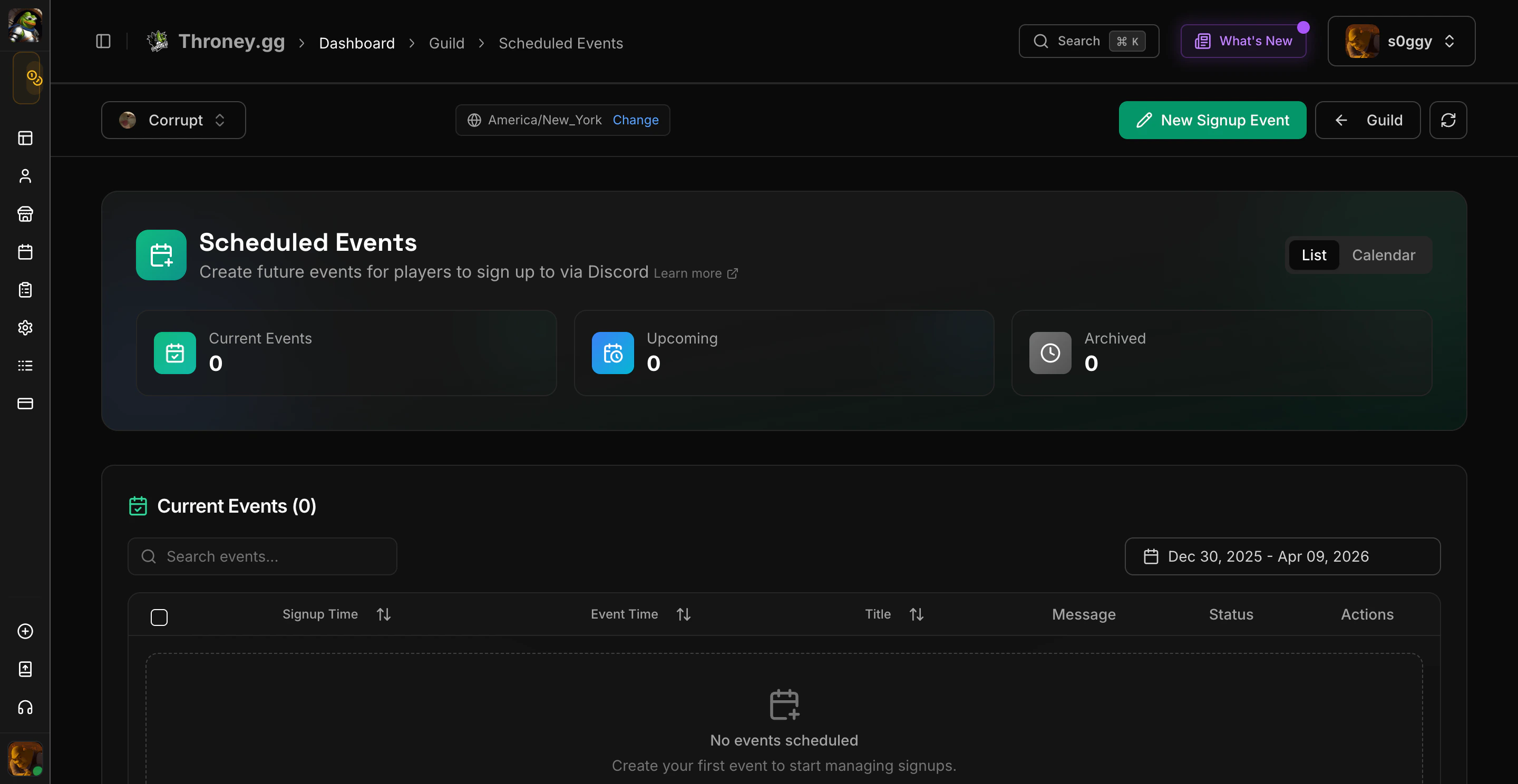
**Scheduled Events** (previously called "Dynamic Events" or "Signups") let members indicate their availability for upcoming events. Officers get a structured way to manage event participation through both the dashboard and Discord.
 **This feature is NOT a substitute for `/attendance`** – it does **not** take attendance automatically. Officers must still **use `/attendance` after the event** to log actual participation.
***
## 📌 Accessing Scheduled Events
To access the **Scheduled Events** panel:
1. **Go to the Throney Dashboard** and navigate to **Scheduled Events** in the sidebar.
2. Click on **"Manage Events"** to open the event management section.
3. In the **top right corner**, click the **"Add Event"** button to create a new event.
You can switch between **List view** and **Calendar view** using the tabs at the top of the page.
***
## 🛠️ Creating a Dynamic Event
When adding a new event, officers must configure the following settings:
* **Event Title** – The name of the event.
* **Description & Notes** – Any additional information regarding the event.
* **Signup Time** – The exact time the signup notification will be posted in Discord.
* **Event Time** – The scheduled start time of the event.
* **Recurring Event Settings** – Option to schedule repeating events every X days.
* **Event Role Requirement** – Restrict signups to specific roles (e.g., Tanks, DPS, Healers).
* **Ping Role** – The role that will be mentioned when the signup goes live.
* **Signup Channel** – The Discord channel where signups will be posted.
* **Updates Channel** – The Discord channel where event reminders and updates will be sent.
* **Voice Channel Selection** – Specify the voice channel where participants should gather.
Once all settings are filled out, click **"Save"** to finalize the event.
***
## 🧩 Signup Buttons on Discord
After a signup is posted in Discord, the following buttons will appear:
* `✅ Signups` – Displays attending, absent, tentative, ineligible, and unknown members.
* `🎉 Parties` – Displays each party and the characters in them.
* `🌐 Website` – Redirects to the respective signup’s page on the Throney Dashboard.
* `📣 Ping Unknown` – Allows officers to send a customizable reminder message to members who haven’t responded. The message appears as a reply to the original signup embed and is labeled with the staff member who sent it.
***
## ♻️ Recurring Events
When creating a signup, you can now configure the event to repeat every X days. Throney will automatically duplicate the signup and post it at the same interval.
This is ideal for daily/weekly siege planning, static content, and other repeatable events.
***
## 🧠 Party Builder (Loadouts)
Party creation is now fully integrated with Dynamic Events!
### Create Loadouts
You can create two types of templates:
* **Player Templates** – Build parties using specific players.
* **Class Templates** – Use role tags like Tank, Healer, RDPS, MDPS, Bomber.
### Loadout Import Behavior
* Importing a loadout clears your current party setup.
* Parties will be built based on your selected template.
* **Player Templates** – Fills in members if they're attending.
* **Class Templates** – Randomly fills in roles from the attendee pool.
* Parties may be partially or fully empty if users are not available.
After importing, you can freely **edit the loadout, move players**, or **import a new template**.
***
## 📜 New Command: `/loadout`
This new command shows party loadouts for your alliance directly in Discord.
```bash theme={null}
/loadout
```
Skips loadouts that are empty or have no members.
Replaces the older /party command (now removed).
***
## 🔍 Dynamic Events vs. Attendance Tracking
| Feature | Dynamic Events (Signups) | Attendance Tracking (`/attendance`) |
| -------------------- | ------------------------------------ | ------------------------------------- |
| **Purpose** | Pre-event signup tracking | Post-event attendance logging |
| **Functionality** | Allows members to sign up for events | Tracks actual participation in events |
| **Recurring Events** | ✅ Supports scheduling | ❌ Not applicable |
| **Integration** | Loadouts, reminders, ping roles | DKP & participation logs |
| **Required for DKP** | ❌ No, must use `/attendance` | ✅ Yes, logs attendance for DKP |
***
## 🎯 Benefits of Signups (Dynamic Events)
✔️ **Pre-Event Organization** – Know who is attending before an event starts.\
✔️ **Recurring Events** – Automatically manage routine events.\
✔️ **Loadout Templates** – Create structured parties in seconds.\
✔️ **Streamlined Management** – All from your Discord or dashboard.\
✔️ **Officer Tools** – Ping unknowns, view role eligibility, filter participants.
***
***
## Bulk Event Management
Select multiple events from the table using checkboxes and delete them in one action. Each event row also has a dropdown menu with quick actions: View Details, Archive, and Delete.
***
## Inline Quick Actions
Every event row in the table has a three-dot dropdown menu with:
* **View Details**: Open the event page
* **Archive**: Archive the event and move the Discord message to the archive channel
* **Delete**: Remove the event with a confirmation dialog
***
Give feedback or check updates in our [Discord](https://discord.gg/KkhwKu4ns6).
**This feature is NOT a substitute for `/attendance`** – it does **not** take attendance automatically. Officers must still **use `/attendance` after the event** to log actual participation.
***
## 📌 Accessing Scheduled Events
To access the **Scheduled Events** panel:
1. **Go to the Throney Dashboard** and navigate to **Scheduled Events** in the sidebar.
2. Click on **"Manage Events"** to open the event management section.
3. In the **top right corner**, click the **"Add Event"** button to create a new event.
You can switch between **List view** and **Calendar view** using the tabs at the top of the page.
***
## 🛠️ Creating a Dynamic Event
When adding a new event, officers must configure the following settings:
* **Event Title** – The name of the event.
* **Description & Notes** – Any additional information regarding the event.
* **Signup Time** – The exact time the signup notification will be posted in Discord.
* **Event Time** – The scheduled start time of the event.
* **Recurring Event Settings** – Option to schedule repeating events every X days.
* **Event Role Requirement** – Restrict signups to specific roles (e.g., Tanks, DPS, Healers).
* **Ping Role** – The role that will be mentioned when the signup goes live.
* **Signup Channel** – The Discord channel where signups will be posted.
* **Updates Channel** – The Discord channel where event reminders and updates will be sent.
* **Voice Channel Selection** – Specify the voice channel where participants should gather.
Once all settings are filled out, click **"Save"** to finalize the event.
***
## 🧩 Signup Buttons on Discord
After a signup is posted in Discord, the following buttons will appear:
* `✅ Signups` – Displays attending, absent, tentative, ineligible, and unknown members.
* `🎉 Parties` – Displays each party and the characters in them.
* `🌐 Website` – Redirects to the respective signup’s page on the Throney Dashboard.
* `📣 Ping Unknown` – Allows officers to send a customizable reminder message to members who haven’t responded. The message appears as a reply to the original signup embed and is labeled with the staff member who sent it.
***
## ♻️ Recurring Events
When creating a signup, you can now configure the event to repeat every X days. Throney will automatically duplicate the signup and post it at the same interval.
This is ideal for daily/weekly siege planning, static content, and other repeatable events.
***
## 🧠 Party Builder (Loadouts)
Party creation is now fully integrated with Dynamic Events!
### Create Loadouts
You can create two types of templates:
* **Player Templates** – Build parties using specific players.
* **Class Templates** – Use role tags like Tank, Healer, RDPS, MDPS, Bomber.
### Loadout Import Behavior
* Importing a loadout clears your current party setup.
* Parties will be built based on your selected template.
* **Player Templates** – Fills in members if they're attending.
* **Class Templates** – Randomly fills in roles from the attendee pool.
* Parties may be partially or fully empty if users are not available.
After importing, you can freely **edit the loadout, move players**, or **import a new template**.
***
## 📜 New Command: `/loadout`
This new command shows party loadouts for your alliance directly in Discord.
```bash theme={null}
/loadout
```
Skips loadouts that are empty or have no members.
Replaces the older /party command (now removed).
***
## 🔍 Dynamic Events vs. Attendance Tracking
| Feature | Dynamic Events (Signups) | Attendance Tracking (`/attendance`) |
| -------------------- | ------------------------------------ | ------------------------------------- |
| **Purpose** | Pre-event signup tracking | Post-event attendance logging |
| **Functionality** | Allows members to sign up for events | Tracks actual participation in events |
| **Recurring Events** | ✅ Supports scheduling | ❌ Not applicable |
| **Integration** | Loadouts, reminders, ping roles | DKP & participation logs |
| **Required for DKP** | ❌ No, must use `/attendance` | ✅ Yes, logs attendance for DKP |
***
## 🎯 Benefits of Signups (Dynamic Events)
✔️ **Pre-Event Organization** – Know who is attending before an event starts.\
✔️ **Recurring Events** – Automatically manage routine events.\
✔️ **Loadout Templates** – Create structured parties in seconds.\
✔️ **Streamlined Management** – All from your Discord or dashboard.\
✔️ **Officer Tools** – Ping unknowns, view role eligibility, filter participants.
***
***
## Bulk Event Management
Select multiple events from the table using checkboxes and delete them in one action. Each event row also has a dropdown menu with quick actions: View Details, Archive, and Delete.
***
## Inline Quick Actions
Every event row in the table has a three-dot dropdown menu with:
* **View Details**: Open the event page
* **Archive**: Archive the event and move the Discord message to the archive channel
* **Delete**: Remove the event with a confirmation dialog
***
Give feedback or check updates in our [Discord](https://discord.gg/KkhwKu4ns6).