> ## Documentation Index
> Fetch the complete documentation index at: https://docs.throney.gg/llms.txt
> Use this file to discover all available pages before exploring further.
# Wishlists
> Manage item priority lists for fair and transparent loot distribution.
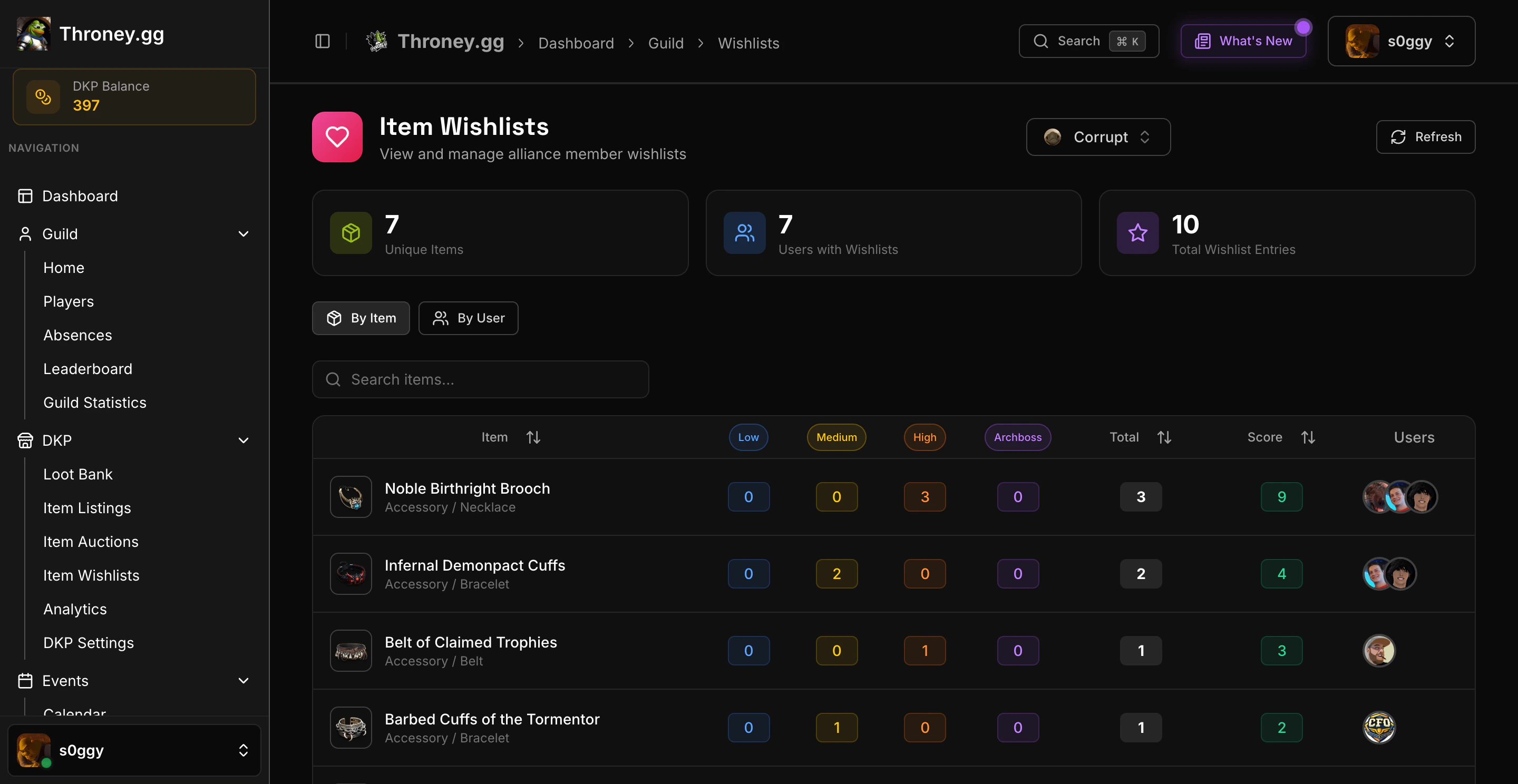
The Wishlist system allows members to declare their desired items with priority levels, helping officers make informed loot decisions.
 ***
## 📌 How Wishlists Work
Members can add items to their wishlist with one of four priority levels:
* **Low** – Nice to have
* **Medium** – Would like this item
* **High** – Strongly desired upgrade
* **Archboss** – Top priority, essential item
***
## 🛠️ Managing Your Wishlist
### Adding Items
1. Navigate to **DKP → Wishlists** on the dashboard
2. Click **"Add Item"**
3. Search for the item from the database
4. Select your priority level
5. Save the wishlist entry
### Editing Priority
* Click on any wishlist item to change its priority
* Remove items you no longer need from the dashboard
### Removing Items via Discord
Use the `/removewishlist` command to remove an item from your wishlist directly in Discord.
```bash theme={null}
/removewishlist
***
## 📌 How Wishlists Work
Members can add items to their wishlist with one of four priority levels:
* **Low** – Nice to have
* **Medium** – Would like this item
* **High** – Strongly desired upgrade
* **Archboss** – Top priority, essential item
***
## 🛠️ Managing Your Wishlist
### Adding Items
1. Navigate to **DKP → Wishlists** on the dashboard
2. Click **"Add Item"**
3. Search for the item from the database
4. Select your priority level
5. Save the wishlist entry
### Editing Priority
* Click on any wishlist item to change its priority
* Remove items you no longer need from the dashboard
### Removing Items via Discord
Use the `/removewishlist` command to remove an item from your wishlist directly in Discord.
```bash theme={null}
/removewishlist -
```
***
## 👑 Officer View
Officers can view all member wishlists to:
* See who wants specific items
* Compare priority levels across members
* Make fair loot distribution decisions
* Remove individual items from a member's wishlist if needed
Wishlist data is used alongside DKP balance when deciding item awards. Higher priority + higher DKP typically wins.
***
## 📋 Wishlist in Loot Distribution
When an item drops:
1. Officer posts item via DKP Item Listing
2. Members react based on interest
3. Officer checks who has the item on their wishlist
4. Priority level + DKP balance determines winner
***
## 🎯 Best Practices
* Keep your wishlist updated as you get gear
* Use **Archboss** sparingly for truly essential items
* Remove items after receiving them
* Check class-appropriate items for your build